Permissions allow you to control what your company’s users can see on your company account.
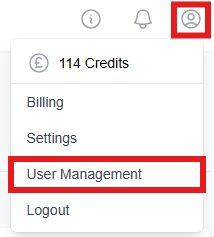
If you have ‘Admin User’ rights, you will have the ability to manage your own permissions or those of your colleagues via the ‘User Management’ page. Navigate here by going to ‘Settings’ and selecting ‘User Management’.
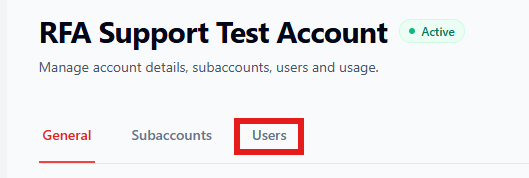
Go to the 'Users' tab.
Select the user whose permissions you would like to change by clicking 'View'.

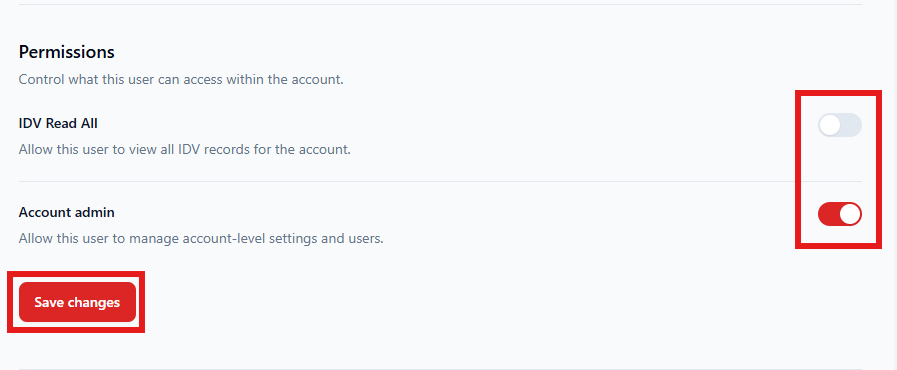
Use the toggle to switch 'IDV Read All' and 'Account admin' permissions on or off. For API access, our team can support you - raise a ticket here. Remember to 'Save changes'.
If you do not have ‘Admin User’ rights, please reach out to a colleague who is an ‘Admin User’ on your account, or contact your Account Manager at Red Flag Alert. If you do not know who your account manager is, please submit a ticket using this link.
Was this article helpful?
That’s Great!
Thank you for your feedback
Sorry! We couldn't be helpful
Thank you for your feedback
Feedback sent
We appreciate your effort and will try to fix the article