When a portfolio is created, alerts are set as active for all events by default. You can remove events by clicking the 'X' in the grey box of any event in the list, or add them back by selecting them from the drop down menu.
To avoid inbox clutter, the Red Flag Alert system sends a daily round up email of alerts for each portfolio (if there are events to notify you of). If you would like to receive notifications for a particular event immediately, you can toggle the 'Is immediate' button to 'on'. This allows you the flexibility to determine which events are most critical to your business.
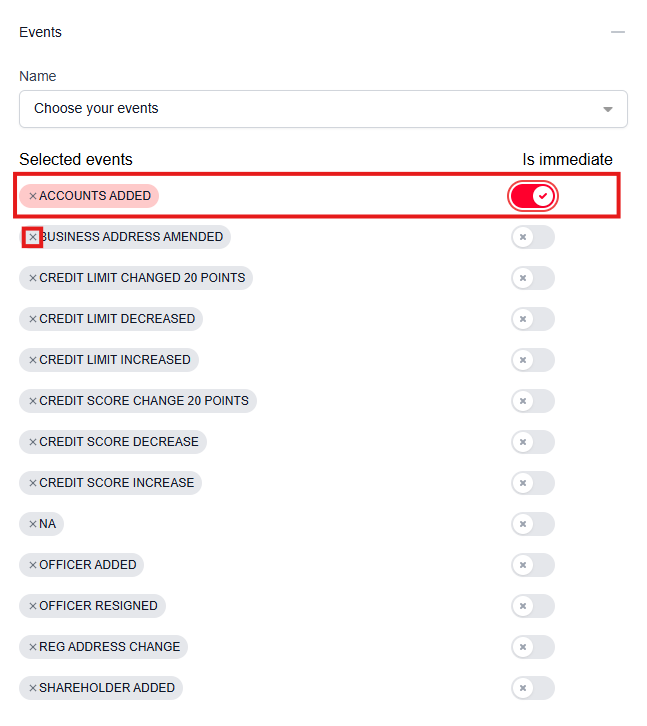
Glossary of events
- ACCOUNTS ADDED - Financial accounts have been added.
- BUSINESS ADDRESS AMENDED - Change in the registered office address of business.
- CREDIT LIMIT CHANGED 20 POINTS - The credit limit has changed by 20%.
- CREDIT LIMIT DECREASED - The company's credit limit has decreased.
- CREDIT LIMIT INCREASED - The company's credit limit has increased.
- CREDIT SCORE CHANGE 20 POINTS - The company's credit score has changed by 20 points.
- CREDIT SCORE DECREASE - The company's credit score has decreased.
- CREDIT SCORE INCREASE - The company's credit score has increased.
- OFFICER ADDED - A new officer has been added.
- OFFICER RESIGNED - An officer has officially resigned from their position.
- REG ADDRESS CHANGE - The business's registered address (Head Office) has been officially changed.
- SHAREHOLDER ADDED - A new shareholder has been added to the business.
Was this article helpful?
That’s Great!
Thank you for your feedback
Sorry! We couldn't be helpful
Thank you for your feedback
Feedback sent
We appreciate your effort and will try to fix the article