From the 'Portfolio Manager' page, find the portfolio you would like to modify. You can use the 'Filter' or 'Sort' feature to help you, or use the search bar.
Click to enter the portfolio and scroll down to the list of companies within it.
Click the tick box on the left of any companies you would like to remove from the portfolio, then click 'Delete' above the list to delete them. You also have the option to move them to a different portfolio.
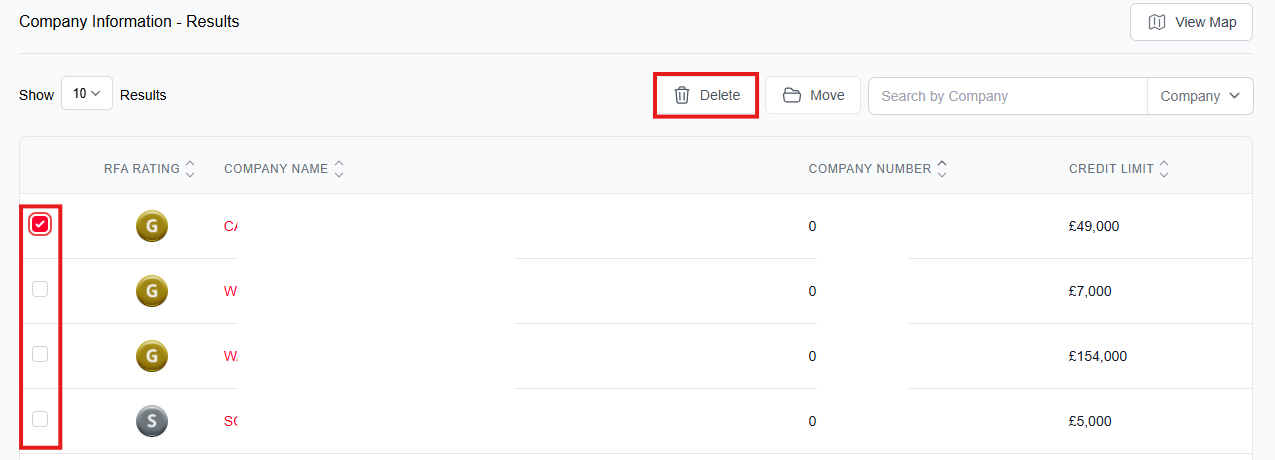
When the confirmation pop-up appears, click 'Delete' to confirm removal of this company. Once the action is complete, your page will refresh to reflect the new list.

Was this article helpful?
That’s Great!
Thank you for your feedback
Sorry! We couldn't be helpful
Thank you for your feedback
Feedback sent
We appreciate your effort and will try to fix the article